In this article, MKT Software will provide you with a comprehensive and easy-to-follow Instructions To Use Content Management Feature On MKT Care. Our goal is to help you navigate the platform efficiently, ensuring that you can quickly master the process of adding and managing content. Whether you’re new to the software or looking to refine your skills, this guide will walk you through every step, offering clear instructions to make content management simple and effective.
1. Add a management category
On the main interface of the software, select Content Management, then choose Add Category.
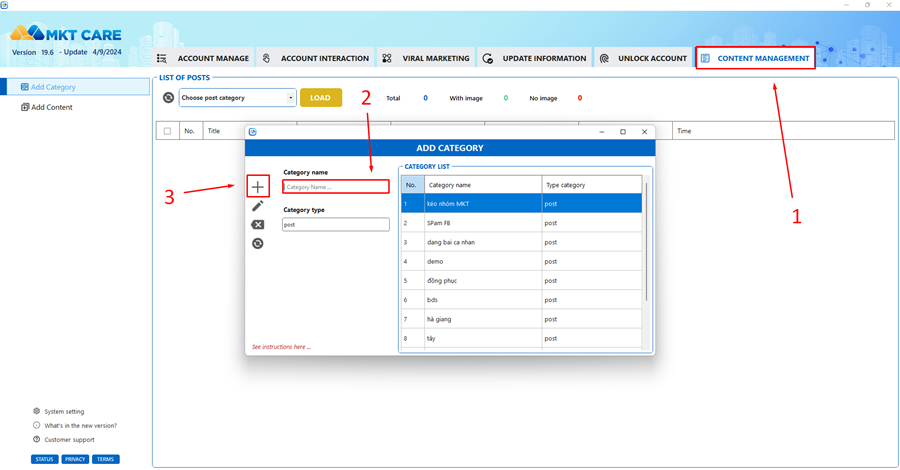
Enter the name of the category you want to add and select the plus icon to create a new content management category.
2. Add content
In the MKT Care software, content is available in two formats:
- Status: A post containing only text.
- Content with image: A post with both text and images.
On the Content Management interface, select Add content. Depending on your needs, choose either Status or Content with image.
Next, enter the Post Title, Content, and Images to be posted.
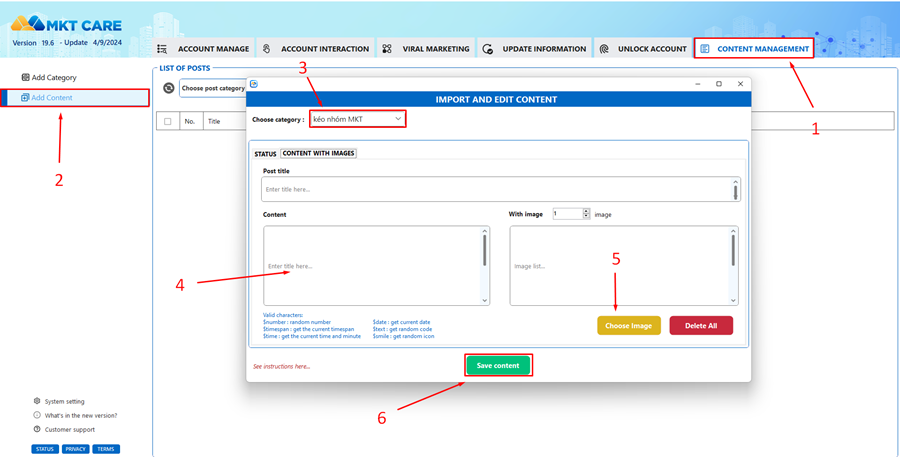
Select the desired Category to save the content and click Save Content to complete adding the content to MKT Care.
In conclusion, Instructions For Managing Content On MKT Care is simple and efficient when following these instructions. By mastering these steps, you’ll be able to quickly add, organize, and save content with ease. We hope this guide helps you navigate the platform smoothly and make the most of its features.