MARKETING AUTOMATION SOLUTIONS DEVELOPER

  • ABOUT US
    • FACEBOOK SOFTWARE

      Software to manage and take care of multiple Facebook accounts

      mkt care

      MKT Care

      MKT CARE - Auto Post, Auto comment Facebook Software

      7

      MKT Post

      Automatically post sales posts on Facebook

      MKT TikPro

      MKT TikPro

      MKT TikPro - Auto post video, auto comment livestream Tiktok

      6

      MKT Page

      MKT Page - Auto post multiple Fanpage Facebook

      MKT Viral

      MKT Viral

      MKT Viral – Auto download and edit multiple short videos across platforms

      MKT Tube

      MKT Tube

      MKT Tube- Auto Post, Auto comment Youtube Software

      10

      MKT Insta

      MKT Page - Auto Post, Auto comment Instagram Software

      9

      MKT Group

      MKT Group - Specialized Facebook Group management software

      MKT X

      MKT X

      MKT X- Auto Post, Auto comment Twitter Software

      MKT UID

      MKT UID

      MKT UID - Scan multiple UID group, UID members group,...

      5

      MKT LinkedIn

      MKT Linkedin - Marketing software on LinkedIn platform

  • DOWNLOAD

Step-by-Step Guide: Scan account management MKT UID

Rate this post

Effective account management is essential to optimize the use of MKT UID software in marketing automation. This guide provides step-by-step instructions for Scan account management, helping you scan out Facebook UIDs in bulk for you to reach more customers automatically.

I. Add Account Category

The account management category is intended to classify Facebook accounts for different tasks. Depending on your needs and objectives, you can add multiple account categories to manage Facebook accounts within the software.
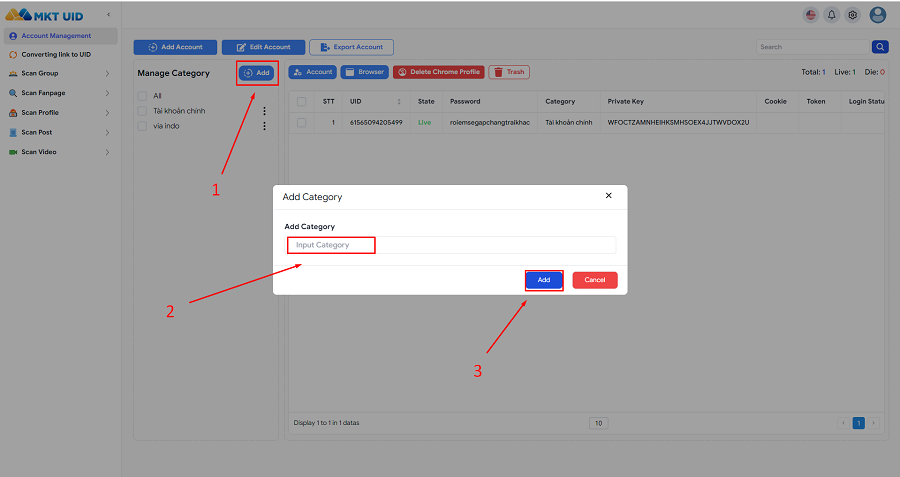
Effective account management in MKT UID

In the main interface of the software, select Manage Categories -> Add Category -> then enter the category name and choose Save to complete.

II. Add Accounts to MKT UID Software

In the Account Management interface, select Add Account -> then paste the account format you have into the Account Data field.
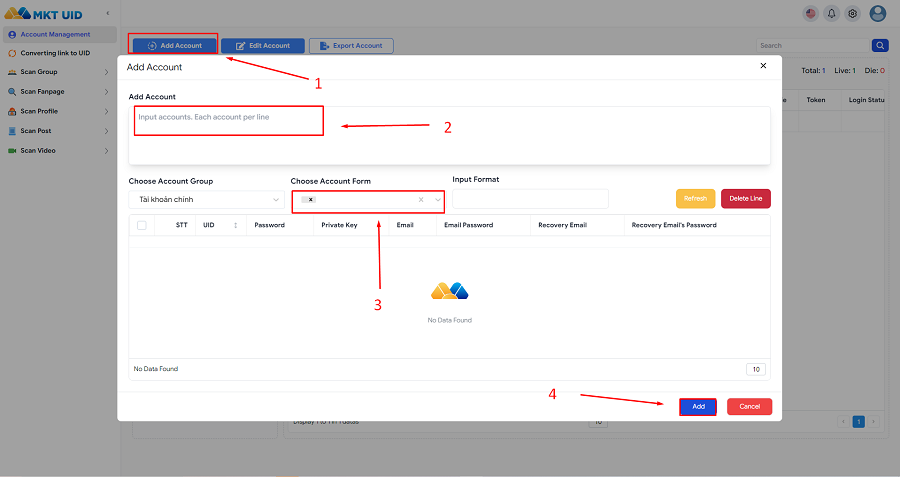
Effective account management in MKT UID

Select the account format before saving (UID, Password, 2FA, Email, Email Password, Recovery Email, etc.). Depending on your account file, adjust the format accordingly.

Select the data format, choose the Account Group to save, then click Save to complete.

III. Conclude

Knowing how to manage accounts in MKT UID effectively helps you streamline your social media marketing efforts. MKT UID helps you scan 1 million UIDs


RELATED ARTICLES

MKT SOFTWARE COMMITMENT
+84819551862