MARKETING AUTOMATION SOLUTIONS DEVELOPER

  • ABOUT US
    • FACEBOOK SOFTWARE

      Software to manage and take care of multiple Facebook accounts

      mkt care

      MKT Care

      MKT CARE - Auto Post, Auto comment Facebook Software

      7

      MKT Post

      Automatically post sales posts on Facebook

      MKT TikPro

      MKT TikPro

      MKT TikPro - Auto post video, auto comment livestream Tiktok

      6

      MKT Page

      MKT Page - Auto post multiple Fanpage Facebook

      MKT Viral

      MKT Viral

      MKT Viral – Auto download and edit multiple short videos across platforms

      MKT Tube

      MKT Tube

      MKT Tube- Auto Post, Auto comment Youtube Software

      10

      MKT Insta

      MKT Page - Auto Post, Auto comment Instagram Software

      9

      MKT Group

      MKT Group - Specialized Facebook Group management software

      MKT X

      MKT X

      MKT X- Auto Post, Auto comment Twitter Software

      MKT UID

      MKT UID

      MKT UID - Scan multiple UID group, UID members group,...

      5

      MKT LinkedIn

      MKT Linkedin - Marketing software on LinkedIn platform

  • DOWNLOAD

How To Download and Install MKT Care: Software for Automation Marketing On Facebook

5/5 - (1 bình chọn)

MKT Care is Facebook management software, raising Facebook accounts like real users, supporting online business and online sales effectively. Tools to support building online business systems and professional sales on Facebook. And in this blog, MKT Software will guide you how to download and install MKT Care.

I. Guide to download MKT Care Software

To download MKT Care Software, please follow these steps:

Step 1: Access this link to download mkt software
You can access using Google Chrome, Coc Coc or any browser,…

Step 2: Press the Download button here:

How to download MKT Care

Step 3:  Then the software download process will begin.

II. Guide to install MKT Care

To install MKT Care Software, please follow these steps:

Step 1: Create a new folder on your computer and name it phanmemmkt.

Step 1: Create a new folder

Step 2: Store the downloaded file in the “phanmemmkt” folder you created.
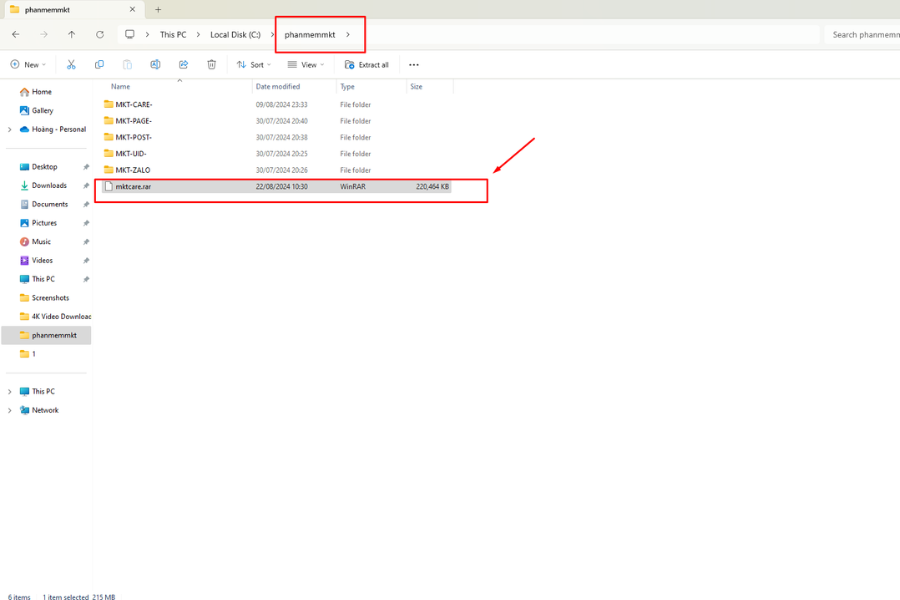
Step 2: Store the downloaded file

Step 3: Extract the downloaded software by pressing the Extract here button.

Step 3: Extract the downloaded software

Step 4: After downloading, please contact MKT software to register an account to use the software

Step 4: Contact us
Step 4: Contact us


Above is the article guiding you on how to download and install MKT Care – Software for Automation Marketing On Facebook. We wish you success!

Contact Me:
► Fanpage Facebook: MKT Software – Auto Marketing Tool

MKT SOFTWARE COMMITMENT
+84819551862